Jira vs Confluence: Differences and How to Use Them Together
What is the difference between Jira and Confluence? Jira is where work gets tracked, Confluence is where knowledge gets written. A bug, a task or a story lives in Jira; the plan, the requirements and the decision behind them live in Confluence. Atlassian Jira and Confluence share the same sign-in, and in the cloud they now even use the same word, “spaces”, for their containers, so it’s no wonder people mix them up.
Most teams don’t choose between the two. They use them together. This guide explains what each tool is for, where the line between them runs, and how to connect them so that a Confluence page shows live Jira status and every Jira work item points back to its context. It covers Jira Cloud and Confluence Cloud as of 2026, with notes for Data Center.
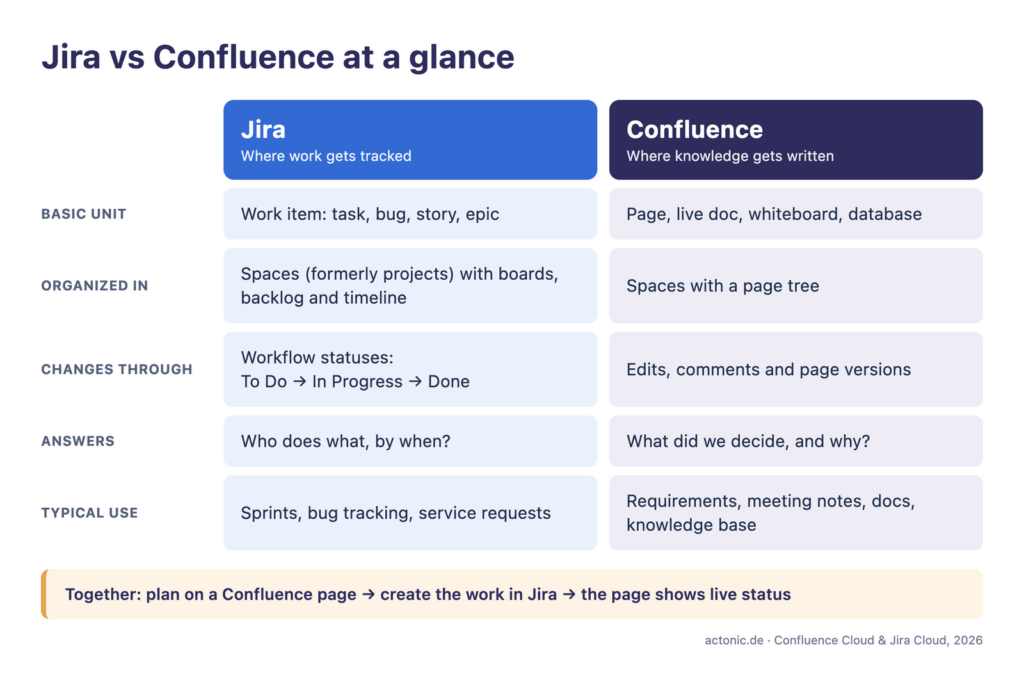
Jira vs Confluence: the short answer
| Aspect | Jira | Confluence |
|---|---|---|
| What it is | Work tracking: tasks, bugs, stories, service requests | Knowledge and collaboration: pages, docs, whiteboards, databases |
| Basic unit | Work item (formerly “issue”) | Page |
| Organized in | Spaces (formerly “projects”) with boards, backlog and timeline | Spaces with a page tree |
| Changes through | A workflow: To Do → In Progress → Done | Edits, comments and page versions |
| Answers the question | Who does what, by when? | What did we decide, and why? |
| Typical users | Developers, project managers, service agents | Everyone who writes things down |
| Free plan | Up to 10 users, 2 GB | Up to 10 users, 2 GB |
The free plans are separate per product, so a small team can run both for free with up to 10 users each.
What Jira is for
Jira tracks units of work through a process. Every work item has a type (task, bug, story, epic), a status, an assignee, a priority and usually a due date or sprint. The workflow defines which statuses exist and who may move a work item from one to the next. Boards, backlogs, timelines and filters show the same work items from different angles.
Use Jira when something:
- has to be done by someone, not just read,
- moves through stages that people need to see,
- needs reporting: how many bugs are open, what is late, what did the team finish this sprint.
Jira Service Management, a Jira product for IT and customer service, adds a help center, queues and SLAs. We explain it in What is Jira Service Management.
What Confluence is for
Confluence holds content that people read, discuss and keep up to date. The basic unit is a page, organized in a page tree inside a space. Next to pages there are live docs, whiteboards, databases and Slides. Every published change creates a new page version, so you can always see who changed what.
Use Confluence when something:
- needs explanation or context: requirements, specs, how-tos, onboarding,
- is the record of a decision or meeting,
- should be found later by people who weren’t there.
If you are new to it, start with What is Confluence.
Jira spaces vs. Confluence spaces
Since autumn 2025, Jira Cloud calls projects spaces (Jira Data Center still says projects). The containers work exactly as before; only the name changed. That means there are now two kinds of spaces with the same name and different content:
- A Jira space (for example Nova Commerce, key
NOVA) holds work items, boards and workflows. - A Confluence space (for example Mobile Development) holds pages, live docs and whiteboards.
They are not linked automatically. A common pattern is one Jira space and one Confluence space per team or product, each linked from the other. In JQL you still filter with the project keyword, for example project = NOVA.
Confluence vs Jira: which tool for which content?
| Content | Jira | Confluence |
|---|---|---|
| Bug report from QA | ✓ | |
| Product requirements | ✓, with the work items linked | |
| Sprint planning | ✓ board and backlog | ✓ planning notes and goals |
| Meeting notes | ✓, action items become work items | |
| Release notes | Data comes from the version | ✓ the published text |
| How-to and onboarding | ✓ | |
| IT request from an employee | ✓ Jira Service Management | ✓ as the knowledge base behind the help center |
| Decision log, risk register, RACI | Only if each row needs a workflow | ✓ as a table |
A rule of thumb: if it has an owner and a status, it belongs in Jira. If it needs paragraphs, it belongs in Confluence. Most real work needs both: the requirements page explains why, the work items track what and when.
How Jira and Confluence work together
On Atlassian Cloud, Jira and Confluence on the same site are connected out of the box. There is nothing to install. These are the connections you will use most.
Show Jira work items on a Confluence page
Copy a Jira link and paste it into a Confluence page in edit mode. Confluence recognises the link:
- A link to a single work item (
…/browse/NOVA-46) becomes a smart link with key, summary and status, the quickest way to reference a Jira ticket on a Confluence page. - A link to a search or saved filter (
…/issues/?jql=…) becomes a live list of all matching work items.
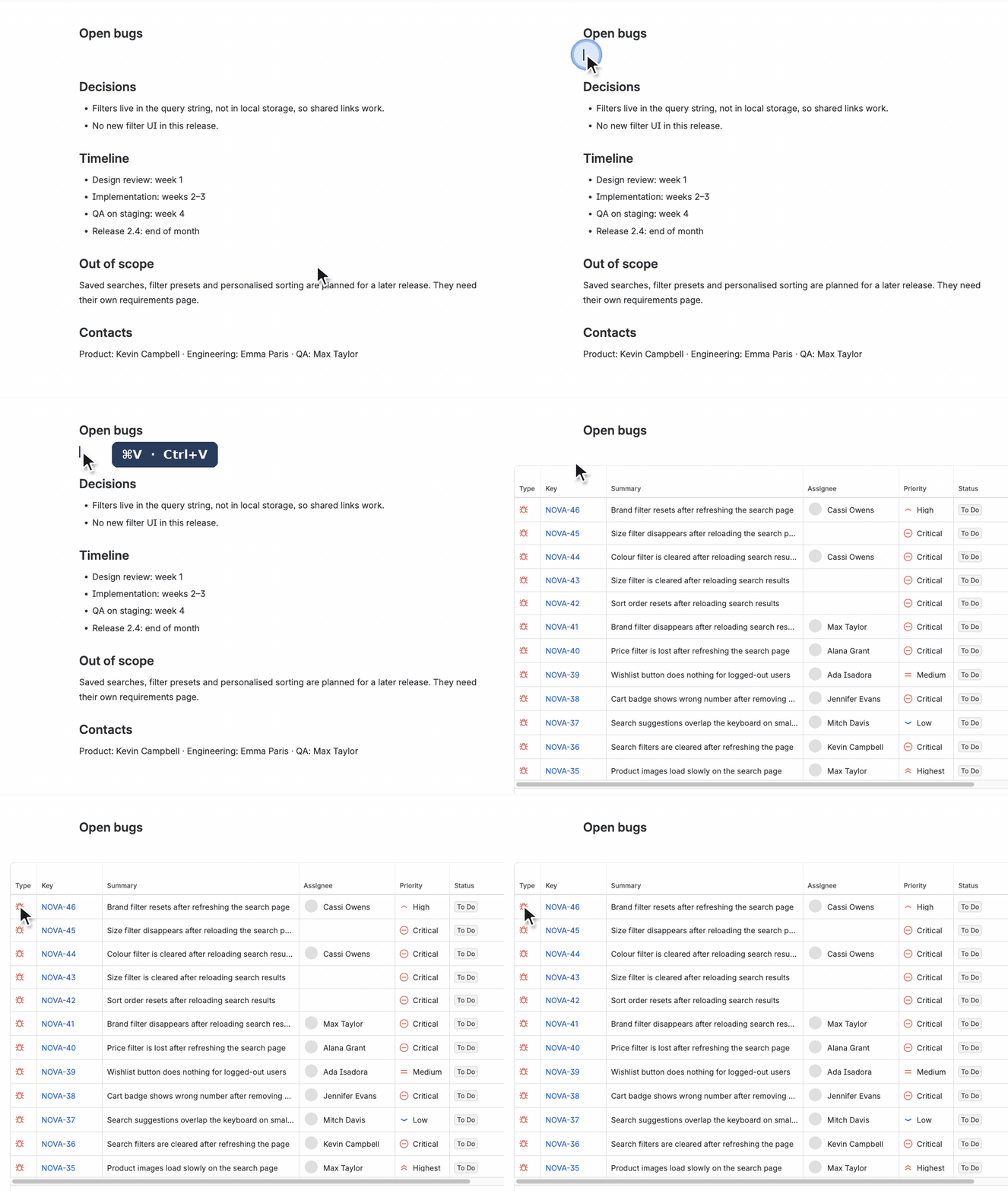
Pasting a Jira search URL into a Confluence page: the URL turns into a live list of work items.
The list updates itself. When a developer moves NOVA-46 to Done in Jira, the Confluence page shows the new status the next time someone opens it. Use the column icon at the top right of the list to choose which fields appear. In the element’s settings you can also choose Total work item count under Display options to show just the number of matching work items.
You can also insert the element without a link: type /jira in the editor, choose Jira work items, and search or enter JQL there.
Create Jira work items from a Confluence page
When a requirement or a meeting note turns into work, you don’t need to retype it in Jira:
- On the published page, highlight the text, for example a row in your requirements table.
- In the toolbar that appears, open ⋯ and choose Create Jira work item.
- A side panel opens. Pick the Jira site, space and work type, check the summary and description, and click Create.
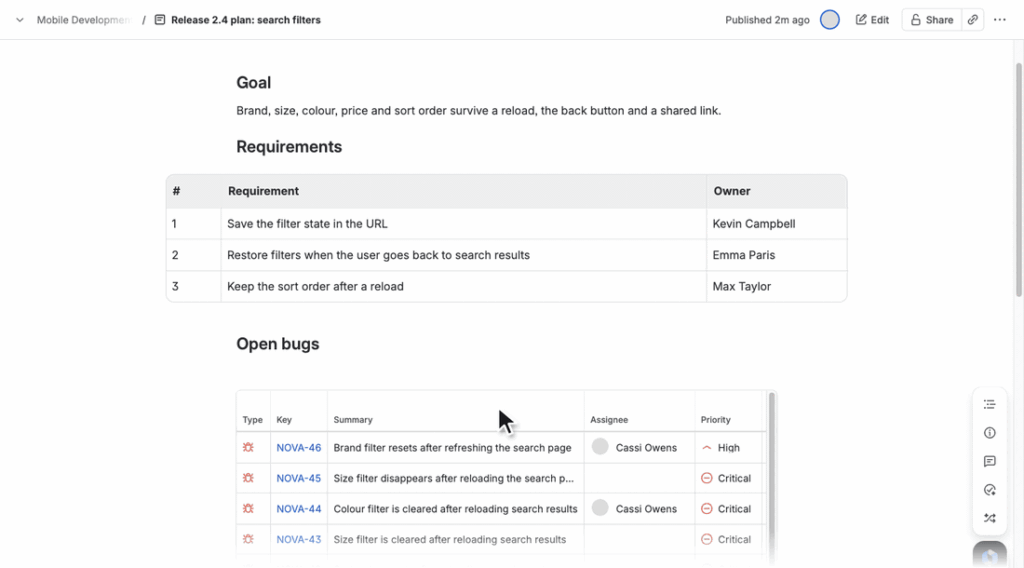
Highlight a requirement, create the Jira work item, and Confluence adds the link right next to the text.
The new work item appears inline next to the text, with its key and live status. If Rovo (Atlassian’s AI) is switched on for your site, the panel fills in the summary and description from the highlighted text and the rest of the page. You can turn that off with the toggle at the top and write them yourself.
If the highlighted text sits in a table, Confluence can also create several work items at once, one per row of that column. We cover more options in Create Jira tickets directly in Confluence.
See Confluence pages inside Jira
The link works in both directions. A work item created from a Confluence page shows that page in Jira, so whoever picks it up can open the requirements in one click.
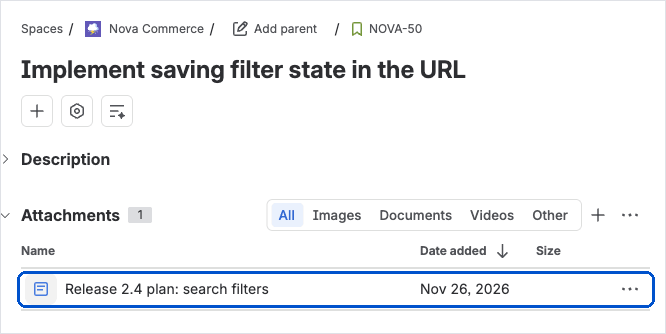
The Confluence page appears inside the Jira work item.
To link an existing page by hand, open the work item, click + and choose the Confluence page. Pages stay linked even if they are later moved or renamed.
Data Center
In Jira Data Center and Confluence Data Center the integration works through an application link that an admin sets up once. Pasting Jira links into pages and creating issues from highlighted text work there too, with the older dialogs. If you run Confluence Cloud with Jira Data Center, Atlassian renamed the Jira Legacy macro to Jira Data Center in April 2026, so look for that name in the editor.
Three setups that work
Product team. One Confluence page per feature with goal, requirements table, open questions and a Jira work items list filtered on that feature. Requirements become work items with the highlight-and-create flow. Stand-ups happen on the Jira board; reviews happen on the page.
Service team. Jira Service Management handles requests. Confluence is the knowledge base behind the help center, so customers find an answer before they open a ticket. Agents turn solved tickets into new articles.
Release management. A Jira version groups the work items. A Confluence page per release shows fixVersion = "2.4" as a live list, plus the human-written release notes, risks and the rollout plan.
Copy-ready JQL for Confluence pages
Paste one of these as a Jira search URL, or enter it in the Jira work items element:
project = NOVA AND statusCategory != Done ORDER BY priority DESC
project = NOVA AND fixVersion = "2.4"
project = NOVA AND sprint in openSprints()
assignee = currentUser() AND statusCategory != Done
project = NOVA AND type = Bug AND created >= -14d
When a Confluence table is enough
Not every list needs to become Jira work items. A decision log, a risk register, a RACI matrix or a small team tracker often works better as a table on the Confluence page where it is discussed. It stays next to its context, and nobody needs a Jira license or a workflow for it. Out of the box, readers can sort a table on the published page, but they can’t filter it, and every cell change means opening the editor. Fast Inline Table Editing + Excel Formulas for Confluence fills that gap: readers filter a column and sort, and anyone allowed to edit the page can change cells and use formulas without opening the editor. Use Jira when the rows need owners, statuses and reports; use a table when they just need to be kept in order.
Common questions about using both
| Question | Answer |
|---|---|
| Do I need both? | Not necessarily. Very small teams sometimes start with one. As soon as you track work and write documentation, both pay off. |
| Can Confluence replace Jira? | For simple to-do lists, Confluence task lists or tables can be enough. For workflows, sprints and reporting, no. |
| Can Jira replace Confluence? | Jira work items have descriptions and comments, but no page tree, no long-form docs and no knowledge base. |
| Why can’t some viewers see the Jira list? | The viewer needs access to Jira and permission to see those work items. Confluence never shows more than Jira allows. |
| Why don’t I see “Create Jira work item”? | You need permission to create work items in at least one Jira space. Check that Confluence is connected to that Jira site (same site in the cloud, application link on Data Center). |
Also worth reading: our table of contents guide to keep long requirements pages easy to navigate, and How to create a Jira ticket.
FAQ
What is the difference between Jira and Confluence?
Jira tracks work: tasks, bugs and stories move through a workflow and have an owner and a status. Confluence holds knowledge: pages with requirements, documentation and meeting notes. Jira answers “who does what, by when”, Confluence answers “what did we decide, and why”.
Do Jira and Confluence work together?
Yes. On Atlassian Cloud they are connected automatically when they are on the same site. You can show live Jira work items on Confluence pages, create work items from highlighted text, and see linked pages inside Jira.
How do I show Jira work items in Confluence?
Paste a Jira link into a Confluence page in edit mode. A link to one work item becomes a smart link; a link to a search or filter becomes a live list. You can also type /jira and choose Jira work items.
How do I reference a Jira ticket on a Confluence page?
Copy the work item’s URL, for example …/browse/NOVA-46, and paste it into the page. Confluence shows the key, summary and current status.
Can I create a Jira ticket from Confluence?
Yes. Highlight text on a published page, open the ⋯ menu in the toolbar and choose Create Jira work item. Pick the space and work type and click Create. The work item appears next to the text.
What are Jira spaces?
Spaces are what Jira Cloud used to call projects; Atlassian renamed them in autumn 2025. Jira Data Center still uses “projects”. They still hold work items, boards and workflows, and in JQL you still filter with the project keyword.
Is Confluence free if I have Jira?
No, they are licensed separately. Both have a Free plan for up to 10 users each, so small teams can use both at no cost.
Do I need Confluence for Jira?
Not for tracking work. You need it as soon as you want requirements, documentation, meeting notes or a knowledge base in one searchable place that links to the work.
Can Confluence pages be updated automatically from Jira?
The Jira work items list on a page always shows the current status from Jira. The rest of the page is written by people, so text such as release notes still needs an update by hand or with automation.
Does the integration work in Data Center?
Yes, through an application link between Jira Data Center and Confluence Data Center that an admin sets up once. The features are similar, with older dialogs.