Attachment Scanner for Jira Cloud – find hidden PII, passwords & secrets with OCR
You want to find PII, passwords or API keys inside your Jira attachments through OCR and regex pattern matching – even when they are buried in screenshots and scanned PDFs? With a single app you can scan every Jira attachment for GDPR/DSGVO, CCPA, HIPAA and any data-privacy law around the world. Say goodbye to blind spots in your Jira.
- Find what your DLP tools never see
- Stop secrets hiding in screenshots
- Avoid million-euro fines from buried PII
One single app to scan every Jira attachment for sensitive data
Because manual review of thousands of tickets is not a strategy – and your DLP tools never look inside a screenshot.
Your scope, your rules
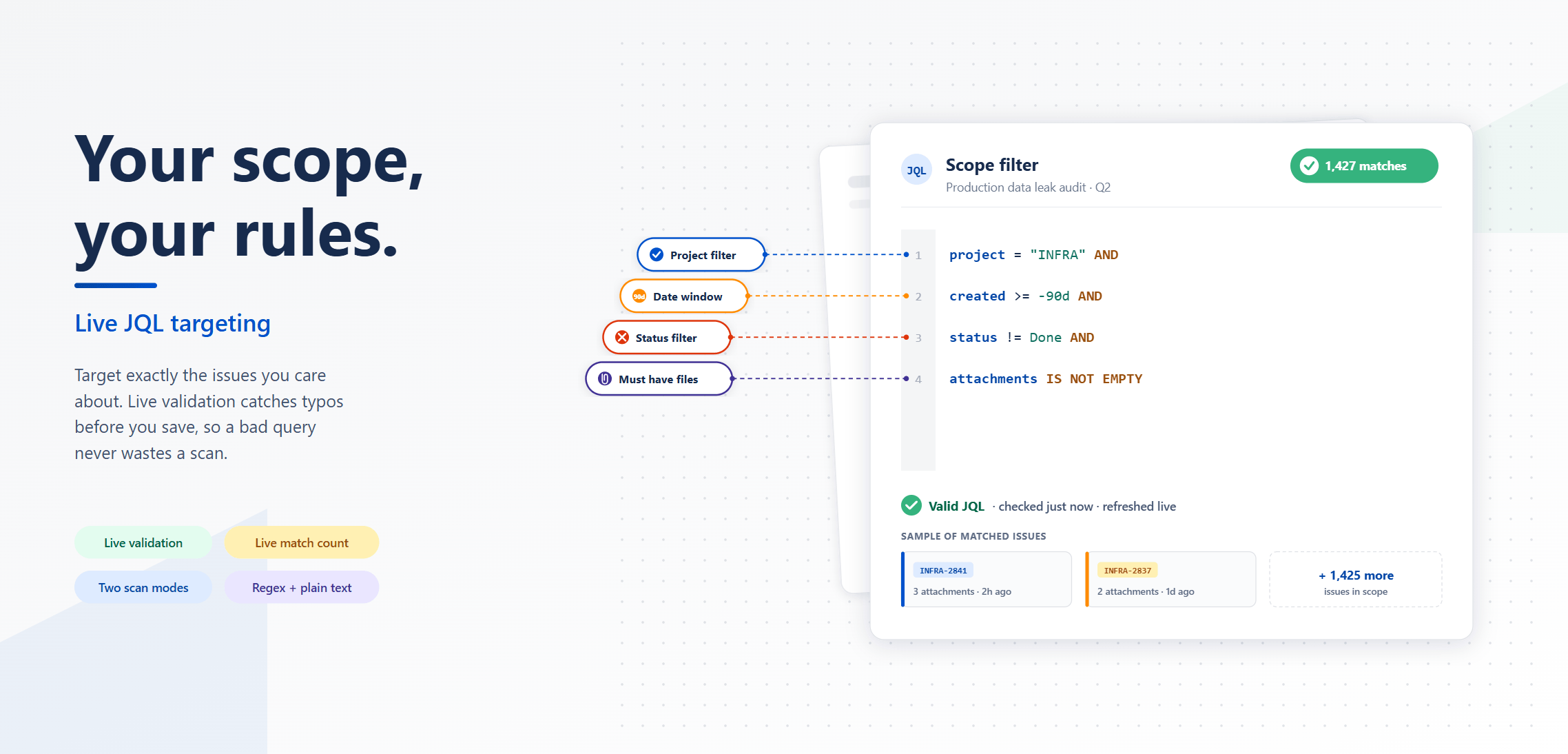
You want to scan only a single project, or every issue created in the last 90 days, or just the open tickets with attachments? Define the exact scope of every scan with full JQL. Whether you target a five-person team or fifty thousand work items, you stay in full control of where the scanner looks.
Check your findings
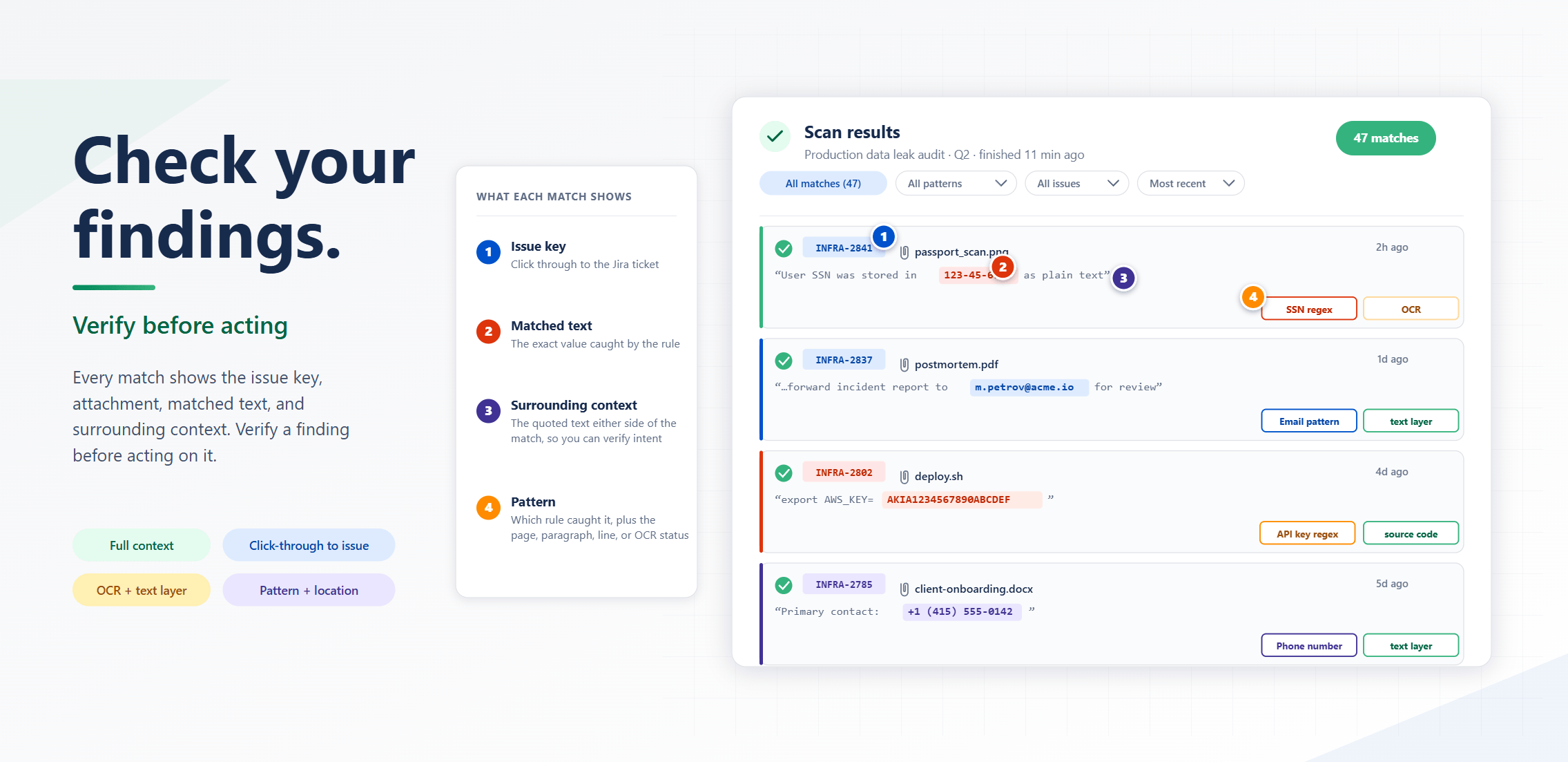
Every match shows the issue key, the attachment name, the matched text and the surrounding context, so you can verify a finding before acting on it. Click the issue key and you land directly inside the original Jira work item, ready to remediate. Skipped files and warnings sit right next to the matches, never hidden away. Compliance audits stop being a guessing game.
Your dashboard
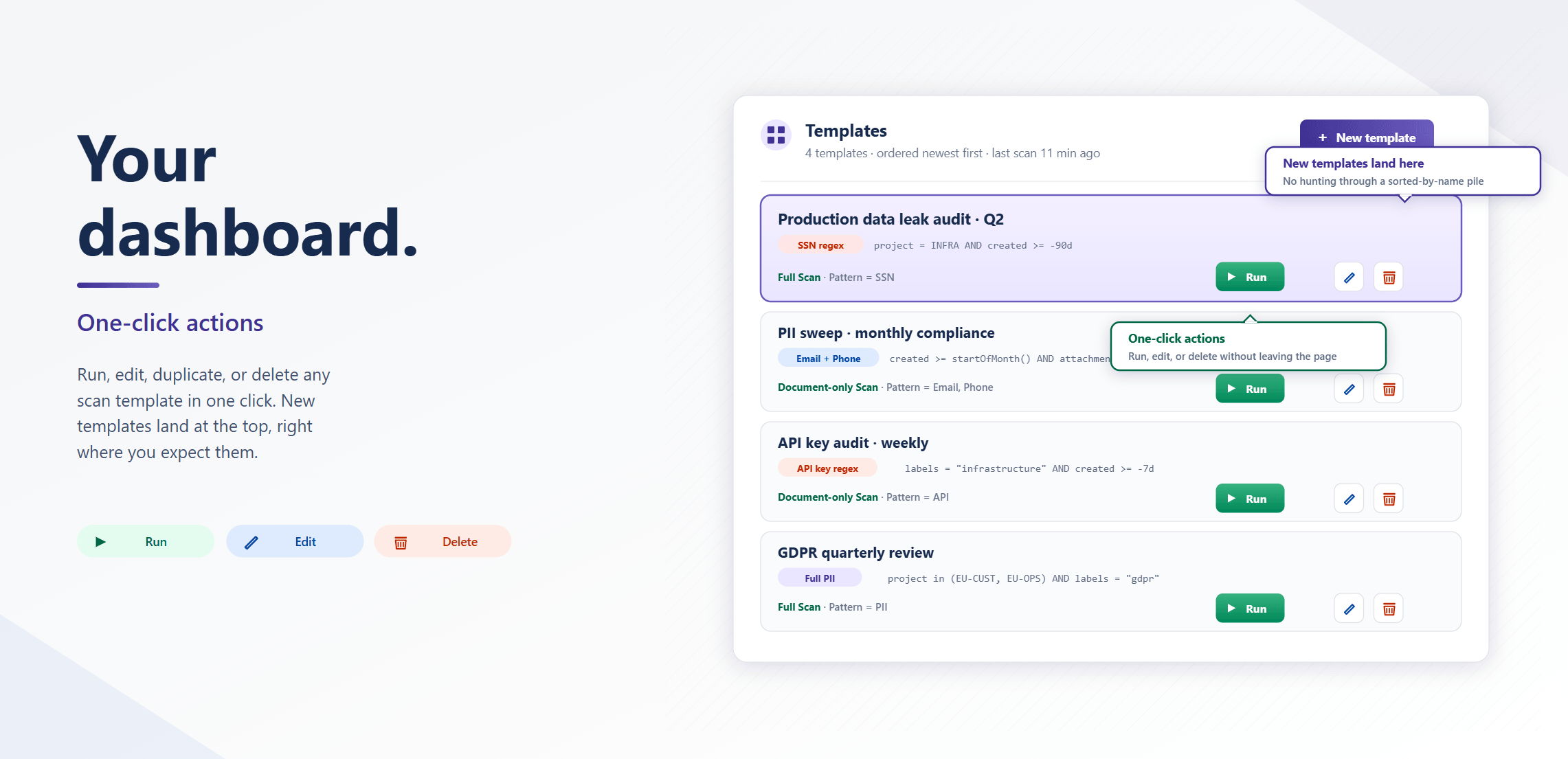
Run, edit, delete or duplicate any scan template with a single click. Cross-scan statistics show your overall match rate, OCR versus direct text extraction, your top-firing patterns and the projects with the most violations. Newly created templates always land at the top of the list, right where you expect them.
Want a short excursion? Discover data protection, data residency, AWS and much more, easily explained in our knowledge base.
The only Jira attachment scanner with OCR and zero third-party AI
Maximum coverage meets minimal risk. Attachment Scanner for Jira is unique in the Atlassian ecosystem because it reads the text inside every attachment – even screenshots and scanned PDFs – without sending a single byte to a public AI service.

Your benefits with Attachment Scanner for Jira
- Find PII, passwords and API keys hiding inside images and PDFs
- Scan thousands of attachments in minutes, not weeks
- Verify every match with full context before you act
- Avoid million-euro fines from missed compliance violations
- Covers GDPR/DSGVO, CCPA, HIPAA, PCI DSS, SOC 2 and more
- Save time, prove compliance and stop wondering what is hiding in your Jira
Product insights
How to create your first scan template
Define a JQL scope, pick a pattern, choose a scan mode: see how to set up and run your first template in Attachment Scanner for Jira. Read the guide →
How to read your scan results
Verify findings, click straight through to the Jira work item and bulk-clean violating attachments: find out how to act on every match the scanner surfaces. Read the guide →
FAQ
No. Native Jira search and JQL only index text fields and metadata. They cannot read the text inside an image, a screenshot or a scanned PDF. Attachment Scanner opens every supported attachment and runs OCR or direct text extraction on it, so you find sensitive data that Jira search and text-based DLP tools never see.
Create a scan template: define a JQL scope (for example one project or the last 90 days), add a regex or simple text pattern for passwords or API keys, and run a full scan. The app uses OCR to read the text inside screenshots and scanned PDFs and reports every match with the issue key, attachment name, matched text and surrounding context.
Images (PNG, JPG, screenshots), scanned and text-layer PDFs, Office documents (DOCX, XLSX, PPTX), CSV and plain-text files (TXT, JSON, MD). Images and scanned PDFs are read with OCR; text-layer files are read by direct extraction at zero credit cost.
No. OCR runs on dedicated GPU hardware inside the European Economic Area, managed by Actonic. Nothing is sent to OpenAI, Google, Anthropic or any other public AI service. Attachment content is processed in memory only and discarded immediately; only matched snippets are stored inside your own Atlassian Forge storage. When you uninstall the app, Forge removes everything automatically.
Yes. Attachment Scanner works with both Jira Software and Jira Service Management on Jira Cloud. Service-desk tickets often hold high-risk uploads such as ID scans and customer screenshots, which makes them a valuable scope to scan for PII.
No tool can guarantee full compliance on its own. Compliance combines policies, processes, training and technical controls. Attachment Scanner gives you a reliable, repeatable way to detect sensitive data inside Jira attachments, prove coverage to auditors and remediate violations quickly – one essential layer of a complete data-protection programme.
Not yet. Attachment Scanner currently supports Jira Cloud only. If you would benefit from the same OCR-powered scanning in Confluence or on Data Center, get in touch – we prioritise our roadmap based on customer requests.
There is a free 30-day trial with 100 OCR evaluation credits per month so you can test scanning on your own data. The app is paid via the Atlassian Marketplace, with a monthly OCR credit allowance that scales with your Jira user tier. Document-only scans use no credits.
Move securely into the future with Attachment Scanner for Jira
- Find PII, passwords and secrets hiding inside every attachment
- Built-in OCR with zero third-party AI involved
- Click-through findings with full context, ready to act on
- For GDPR/DSGVO, CCPA, HIPAA, PCI DSS, SOC 2 and more