How to Scan Your Entire Jira or Confluence Instance for Personal Data in One Run

Introducing Full Instance Search in the Data Protection and Security Toolkit (DPT) — for GDPR/DSGVO, DSAR responses, ISO 27001, and SOC 2 audits.
Have you ever responded to a Data Subject Access Request under Article 15 GDPR in a Jira instance with 200+ projects? Then you know how the work actually feels. First, you log into DPT and pick a project. Next, you run the scan, export the result, and switch projects. Then run again, switch, run, switch, run. Forty projects in, you start to wonder whether you missed one. Three hours later, you’re still going. And when legal asks “are you sure you covered everything?” — your honest answer is “I think so.”
That’s the gap Full Instance Search is built to close.
What Full Instance Search does: scan all Jira and Confluence projects in one run
Full Instance Search is a new trigger type in the Data Protection and Security Toolkit for Jira and Confluence. Instead of scoping a search to a specific project, space, or set of issues, it scans every project and every space the app has access to. Specifically, that includes issues, comments, attachments, descriptions, custom fields, Confluence pages, and page comments — all in a single configured run.
You set it up the same way as any other DPT search template. First, in the General Configuration step, you give the template a name and pick Full instance search from the Trigger dropdown. Then, you can optionally enable a one-second batch delay to ease pressure on the Atlassian API. Finally, you write a description and set the owner. Next, you move to Fields Processing and define what you’re actually looking for. Options include regex patterns, predefined personal data types (emails, phone numbers, IBANs, national IDs, credit card numbers), or your own custom rules.
That’s the whole setup!
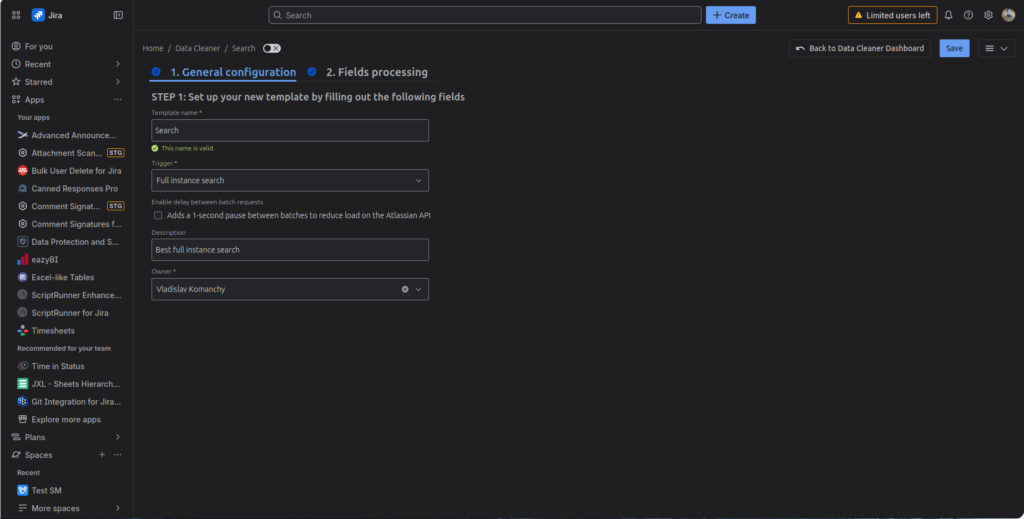
Why instance-wide scanning beats project-by-project for GDPR compliance
The headline isn’t the search itself — DPT could already find personal data across Jira and Confluence content. The headline is scope unification.
When a compliance officer runs project by project, three things go wrong, and Full Instance Search fixes all three.
You can miss projects. For example, a new project gets created on Tuesday. Then your DSAR comes in on Wednesday. However, if you’ve configured your saved searches with explicit project lists, that new project isn’t in any of them. You don’t know what you don’t know. By contrast, Full Instance Search picks up everything the app has permissions to read — including projects and spaces created after you saved the template.
You can’t prove completeness. “I ran the search on these 47 projects” is not the same as “I searched the entire instance.” Auditors and Data Protection Officers (DPOs) increasingly want the second statement. In response, Full Instance Search produces a single audit record that answers the question they’re actually asking.
You burn hours on coordination instead of investigation. After all, setting up 50 searches, monitoring 50 progress bars, exporting 50 result sets, and merging them into one report is administrative work. As a result, it doesn’t make you better at finding personal data. It just makes you slower at it.
Built for large instances: progress timeline, auto-recovery, and full audit log
Scanning a whole Atlassian instance is not a small operation. Mid-sized customers have hundreds of thousands of issues; large enterprises have millions. As a result, a naive “scan everything” button would either time out, hammer the API into rate-limit hell, or fail silently. Worse, you’d have no way to know what got covered if the connection dropped. Therefore, Full Instance Search assumes long-running scans break — and that’s fine, as long as the system handles it correctly.
“It’s not ‘we searched’ — it’s ‘here is the proof we searched.'”
DSAR, right to erasure, ISO 27001: real compliance use cases
Data Subject Access Requests under GDPR/DSGVO
A user submits a DSAR. Depending on jurisdiction, you have between 30 days and “without undue delay” to find every mention of their personal data. Without Full Instance Search, that’s a half-day of clicking. With it, the Jira and Confluence portion collapses to a single configured template. Specifically, the template runs in the background while you handle the rest of the DSAR pipeline. When you send the response, you attach the audit log entry as evidence of completeness.
Right to erasure (Article 17, “right to be forgotten”)
When you need to delete personal data on request, the precondition is finding all of it. The right to erasure is unforgiving. For example, a scan that misses a single comment in an archived project is a compliance failure. Therefore, instance-wide scope is the only way to give your DPO a defensible answer. From there, DPT’s anonymization and redaction tools handle the actual cleanup.
Internal audits, ISO 27001, SOC 2
Are you going through an ISO 27001 audit, a SOC 2 review, or an internal data classification exercise? Then you need repeatable, scoped, evidenced searches. Specifically, save a Full Instance Search template once, run it quarterly, and the audit trail builds itself.
Breach response
When something has gone wrong, you need to know whether attackers exposed sensitive data. But you don’t have time to set up 80 individual searches. You need to know now. One template, one run.
Pre-migration data hygiene
Moving from Server or Data Center to Cloud, consolidating instances, decommissioning old projects? Then run a Full Instance Search before the migration to find and clean personal data that shouldn’t travel with the move. After all, it’s much cheaper to fix in the source instance than to clean up after replication into the new one.
From per-project scans to instance-wide: what changes for Jira admins and DPOs
Honest answer: not much, and that’s deliberate. Full Instance Search is an additional trigger option, not a replacement for the project-scoped and JQL-scoped searches your team already runs. In fact, targeted searches are still the right tool when you’re investigating a specific project, debugging a regex, or running a quick spot-check.
What changes is the default for compliance work. Before: pick a scope, hope you got it all. Now: pick Full instance search, know you got it all. As a result, your DPT template list also starts to look different. Instead of 30 templates named “Project X — emails,” “Project Y — emails,” “Project Z — emails,” you keep one master template per data type and reuse it across runs.
For admins, the operational footprint is meaningfully easier. Are you worried about API load on a busy instance? Then enable the optional one-second batch delay first. Specifically, it adds a small amount of total runtime, but takes most of the pressure off the rate limiter. On Cloud, where Atlassian’s API limits are stricter than on Data Center, leaving the delay enabled is the safe default.
How to set up Full Instance Search in DPT
Full Instance Search is available now in DPT for Jira and DPT for Confluence on the Atlassian Marketplace. If you already have DPT installed, the new trigger appears automatically in the template configuration screen. Specifically, go to Data Cleaner → Create new template, pick Full instance search from the Trigger dropdown, and you’re in.
Don’t have DPT yet? Then the cleanest evaluation path looks like this: install the app on a staging instance, run a Full Instance Search with the predefined personal-data rule set, and review the results. For most customers, the first scan finds unexpected things — old test data with real email addresses, phone numbers in resolved tickets from years ago, attachments with PII that nobody remembered uploading. Usually, that’s the moment the business case writes itself.
Ready to try Full Instance Search?
Available now in DPT for Jira and Confluence on the Atlassian Marketplace — start a free 30-day trial or book a personalized walkthrough.
Frequently Asked Questions
With Full Instance Search in DPT, you create a single template, pick the Full instance search trigger, configure your detection rules (regex or built-in PII patterns), and run. The scan covers every project, issue, comment, attachment, and custom field the app has access to — without configuring projects individually. Confluence works the same way: every space, page, and page comment within the app’s permission scope.
Atlassian Cloud Premium and Enterprise include a native sensitive data detection feature that alerts on updates in real time, plus a content scan for existing data. It’s a strong baseline. However, it stops short for compliance teams in one critical way: producing a single audit-ready record that proves you scanned the whole instance at a specific point in time, with the scope and findings preserved as evidence. That’s the gap DPT’s Full Instance Search fills — on Jira Cloud, Server, and Data Center alike.
Article 15 of GDPR gives data subjects the right to access their personal data within 30 days. For complex cases, you can extend this to 90 days. Specifically, the Jira and Confluence portion of a DSAR response requires finding every mention of the subject’s personal data across the instance. Full Instance Search runs this in a single template and produces an audit log entry as proof of completeness. From there, DPT’s anonymization and redaction tools handle the response phase.
Project-level (and JQL-scoped) scanning requires you to specify which projects to search. As a result, new projects created after you saved the template aren’t covered. By contrast, instance-level scanning automatically covers everything the app has read permissions for, including newly created projects and spaces. For ad-hoc investigation, project-level is faster. However, for compliance audits, DSARs, and right-to-erasure requests, instance-level is the only defensible option.
Three reliability features keep it stable on instances with hundreds of thousands or millions of issues: a live progress timeline so you can monitor multi-hour runs, automatic recovery from interruptions (network blips, node restarts, API throttling), and an optional one-second batch delay to reduce Atlassian API pressure. On Cloud, where rate limits are stricter, leaving the delay enabled is the safe default.
Yes. Specifically, DPT’s audit log captures every run: who started the scan, when, with which template, the scope it covered, and what results came back. As a result, you have the artifact ISO 27001 and SOC 2 auditors typically ask for when reviewing your data classification and access controls in Atlassian tools.

 Request