API keys and secrets in Jira: finding the tokens hiding in your tickets
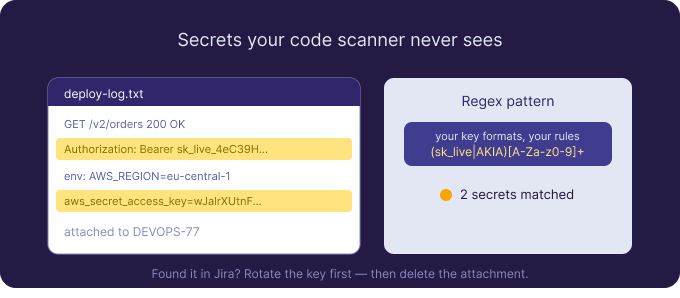
Secret scanning has become standard practice in source code — most teams now block an AWS key or a private token before it ever reaches a repository. Jira is the gap nobody closed. The same engineers who would never commit a secret to Git will happily paste a Postman screenshot showing a bearer token, attach a log file with an API key in a query string, or drop a Terraform variables file onto a ticket so a teammate can reproduce a deployment. The secret never touches your code-scanning pipeline, because it’s sitting in an issue tracker instead.
If you’re looking for a way to find secrets in Jira, the challenge is the same one that makes credential leaks so persistent: the highest-risk material is inside attachments, and attachments are exactly what your other tools don’t read.
Where secrets accumulate in an issue tracker
The patterns are predictable once you look for them. Log files attached to bug reports routinely contain tokens in request URLs or headers. Screenshots of API clients — Postman, Insomnia, a browser’s network tab — show authorization headers in full. Infrastructure-as-code snippets and .env files get attached “just to share the setup.” CI/CD output pasted as a text file includes the variables that were echoed during a failed run. Each is a legitimate part of getting work done, and each can carry a live key that grants access to cloud accounts, payment processors, or third-party APIs.
Unlike a password tied to one account, a leaked API key often has broad, programmatic access and a long life. It’s the kind of secret that turns a forgotten attachment into a real incident.
Why code-style secret scanning misses Jira
Source-code secret scanners watch commits and pull requests. They have no visibility into Jira, and Jira’s own search indexes fields and comments, not the contents of attached files. So a token inside an attached log or a screenshot is invisible to a JQL query, invisible to your repo scanner, and invisible to a malware scan — because a log file or a PNG isn’t malicious, it just happens to contain a secret. The result is a category of leak that your most mature control simply doesn’t cover.
Detecting secrets with patterns you control
Attachment Scanner for Jira reads the contents of attachments and reports where your patterns match — across images, scanned and text-layer PDFs, Office files, CSV, and plain text, with OCR for anything that isn’t already machine-readable. Because secrets tend to follow recognisable shapes, this is where regular expressions earn their keep. You can write patterns for the prefixes and formats your stack uses — keys that begin with a known vendor prefix, long high-entropy strings of a fixed length, Authorization: Bearer headers, or the aws_secret_access_key assignment in a config file. For the simpler cases, literal keywords like api_key, token, client_secret, and private_key are often enough to surface the obvious offenders.
You decide the scope with JQL — a single noisy project, all issues with attachments, or a date range since your last review — and the app reads every matching file. Because there’s no shipped rule catalogue, the patterns are exactly the ones you choose, which is what lets you tune for your own key formats instead of fighting someone else’s generic rules.
From match to triage
Secrets demand fast judgement, and the results view is built for it. Each hit shows the issue key, the file, whether it came from OCR or direct extraction, the matched string, and surrounding context — so you can tell a real sk_live key from documentation that merely mentions one. The statistics dashboard aggregates across scans: your most-matched patterns, the projects and work items with the most hits, and the OCR-versus-direct split, so you learn where in your Jira secrets tend to pile up and can aim future scans accordingly.
Remediate in Jira, rotate everywhere else
When you’ve confirmed a leaked secret, bulk-select the matches and delete the offending attachments — an explicit, admin-confirmed action that’s recorded in the audit log, with no automatic deletion. As with any exposed credential, deleting the file closes the exposure in Jira but does not invalidate the key. Treat any secret that has lived in a ticket as compromised: rotate or revoke it first, then remove the attachment. Discovery and cleanup happen in the app; revocation happens in your cloud and vendor consoles.
The privacy model — and why it matters for secrets
Sending files full of live secrets to a third-party AI service to “scan” them would simply move the risk. Attachment Scanner avoids that by design: OCR runs on dedicated EU/EEA GPU hardware managed by Actonic, with no public AI service involved. Attachments are processed in memory and discarded; only matched snippets are stored, in Atlassian’s Forge storage, isolated per site, with nothing kept on Actonic servers. Uninstalling removes everything. It’s an honest fit for security teams who can’t have sensitive material leaving to an external model.
Knowing the limits
To set expectations: this is on-demand scanning, not write-time prevention — it finds secrets that are already in Jira rather than blocking them at upload, so pair it with developer hygiene and code-side controls. It’s Jira Cloud only for now, with no Data Center or Confluence support, and the per-file size caps are 50 MB for PDFs and 20 MB for images. Within that scope, it reads the attachments your other secret-scanning tools never open. You can start a free 30-day trial from the Atlassian Marketplace and run your first regex patterns against your own data using the monthly evaluation credits.

 Request