Your service desk is a PII goldmine your malware scan can’t see
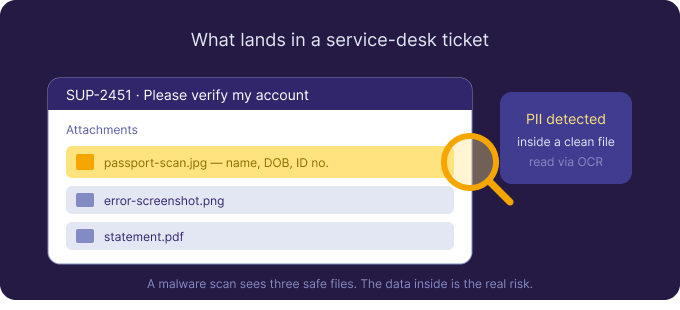
Jira Service Management runs on uploads. Customers attach screenshots of errors, photos of ID documents, exported statements, and PDFs of forms — often containing exactly the personal data you’re obligated to protect. Teams reasonably worry about malware in those uploads, and Jira malware scanning handles that. The quieter problem is that most of those files are completely benign and still a serious liability, because of what’s written inside them.
Malware scanning protects you from a dangerous upload
A customer-facing portal is an obvious place for a malicious file to arrive, so the malware layer matters. Atlassian Cloud applies native malware detection to uploads, and you can add antivirus for anything agents download. This stops the file that is dangerous by nature — necessary, but it says nothing about the file that is dangerous by content.
The real exposure: legitimate files full of personal data
Think about what actually lands in service-desk tickets: a passport scan to verify identity, a screenshot showing an account number, a photo of a card, a medical form attached to a claim. Every one is a clean file that passes a virus scan, and every one is personal or regulated data sitting in a system far more people can reach than you’d like. Multiply by years of tickets and you have a PII archive nobody is watching.
Why your text-based tools don’t catch it
Jira search and JQL index fields, not file contents. Permission schemes govern who opens an issue, not what an attachment reveals. Most DLP reads text in fields and comments. The instant the data is inside a screenshot or a scanned PDF — which, on a service desk, is most of the time — text-based scanning can’t see it.
Reading what’s actually inside the tickets
Attachment Scanner for Jira closes that gap. Scope a scan to your JSM projects with JQL, define patterns for the data you care about (ID numbers, card shapes, email addresses, “confidential”), and the app reads every supported attachment — including images and scanned PDFs — with built-in OCR. Each match comes back with the issue key, file name, matched text, and context, and you can bulk-select and delete offending attachments as an explicit, audit-logged admin action. Nothing is deleted automatically.
A compliance control, not a compliance guarantee
For GDPR, PCI-DSS, or HIPAA, being able to find and remediate personal data inside attachments — and show an audit trail — is a meaningful control. No tool makes you compliant on its own, and this one is deliberately one technical control inside a wider programme. The privacy model suits regulated buyers: OCR on dedicated EU/EEA GPU hardware, no public AI service, attachments processed in memory and discarded, and only matched snippets stored in Atlassian’s Forge storage. Limits to keep in mind: on-demand scans rather than continuous monitoring, and Jira Cloud only for now. You can try it free for 30 days from the Atlassian Marketplace.

 Request