Scanning Jira Attachments for Threats: Why the Real Risk Hides Where Antivirus Can’t Look
Antivirus for Jira is only half the attachment problem
Every active Jira project slowly turns into a file archive. Screenshots from bug reports, spreadsheets exported for a sprint review, scanned forms attached to service-desk tickets, the occasional contract dropped into a comment — over a few years a single instance can hold tens of thousands of attachments nobody has looked at twice. For the people responsible for that instance, two uncomfortable questions follow. Could any of these files be dangerous? And could any of them be exposing data we are not allowed to hold? Searches for an antivirus for Jira, for Jira malware scanning, or for a way to virus scan Jira attachments usually start with the first question. Both questions are real — and they are answered by very different tools.
What a virus scan actually checks in Jira
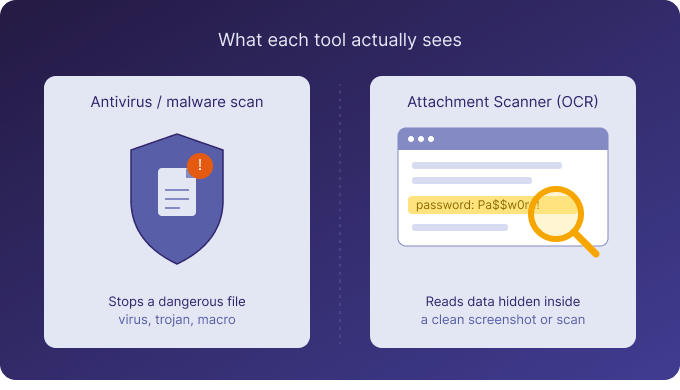
Malware scanning answers one narrow question: is this file itself malicious? An executable disguised as an invoice, a macro-laden spreadsheet, a booby-trapped PDF. Atlassian Cloud applies native malware detection to uploads, and many teams layer their own antivirus or endpoint protection on top for files that leave Jira and land on a laptop. If you are shopping for an antivirus for Jira, that is the layer you want, and you should have one. It catches the file that is dangerous by nature. What it deliberately does not do is read the meaning of the text inside a file that is perfectly clean — and that is where the second, quieter risk lives.
The attachment risk a malware scan can never catch
A screenshot of an admin console showing a plaintext password is not malware. It passes every virus scan ever written, because there is nothing structurally wrong with a PNG. A scanned passport attached to a customer ticket is not a virus; it is a GDPR liability sitting in plain sight. An API key pasted into a config screenshot, a spreadsheet of customer records exported into a ticket, a contract with personal data in the margins — none of these trip a malware scanner, because each file is benign. The danger is the information it carries. For most teams this is the bigger long-term liability, precisely because nothing flags it. The files look harmless, so they pile up, unread and unprotected, for years.
Why Jira’s own tools don’t see inside attachments either
You might assume Jira search would help here. It won’t. Jira search and JQL index fields, not file contents, so a password written inside an image is invisible to a query. Permission schemes control who can open an issue, not what an attachment reveals once it is opened. And most data-loss-prevention tools read text in fields and comments, then stop. The moment sensitive content lands inside a screenshot or a scanned PDF, text-based scanning goes blind — and screenshots and scans are exactly where people paste the things they shouldn’t. An attachment checker for Jira has to be able to read images, or it isn’t checking the riskiest files at all.
Where Attachment Scanner fits — and where it doesn’t
Here is the honest part. Attachment Scanner for Jira is not an antivirus, and it does not scan for malware or viruses. It solves the other half of the problem: finding sensitive data — personal information, passwords, API keys, and other secrets — hidden inside Jira attachments, including the images and scanned PDFs that text-based tools cannot read. It does this with built-in OCR. You define a pattern, either simple text with wildcards or a full regular expression, plus a JQL scope that decides which issues to look at. The app then opens every supported attachment — images, scanned and text-layer PDFs, Office documents, CSV, and plain text — and reports every match with the issue key, the file name, the matched text, and the surrounding context, so a result is never a mystery.
How a scan works in practice
You save reusable templates — a name, a JQL scope, a pattern, a mode — and run them on demand. There are two modes. A full scan reads everything, including images and all PDF types, using OCR where needed. A document-only scan looks at Office and text files alone, skips every image and PDF, costs no OCR credits, and never contacts the OCR service at all. Results land in a dashboard with summary cards and a match table you can click straight through to Jira. When you find something that shouldn’t be there, you bulk-select the matches and delete those attachments — always as an explicit, admin-confirmed action, captured in an audit log. Nothing is ever deleted automatically.
The privacy model behind the OCR
For regulated and EU-based teams, how the reading happens matters as much as what it finds. OCR runs on dedicated GPU hardware in the EU/EEA, managed by Actonic. Nothing is sent to a public AI service — no OpenAI, Google, or Anthropic. Attachment binaries are processed in memory and discarded immediately; only the matched snippets, with a little surrounding context, are stored, and they live in Atlassian’s own Forge storage, isolated per site. Nothing sits on Actonic servers, and uninstalling removes everything. No tool makes you compliant on its own, but this is a clean, auditable control to place inside a wider programme.
Use both — they cover different halves
None of this replaces your antivirus, and Attachment Scanner doesn’t pretend to. Keep malware scanning for the threat of a dangerous file; add attachment scanning for the threat of dangerous information inside a safe one. A few honest limits worth knowing: scans are on demand today, not continuous real-time monitoring; the app is Jira Cloud only, with no Data Center or Confluence support yet; and you define the detection patterns rather than picking from a large shipped rule library. Within that scope, it reads what your other tools can’t. You can try it free for 30 days from the Atlassian Marketplace, with monthly evaluation credits to test OCR on your own data.

 Request