Jira data limits, September 2026: what they cap and how to check your instance
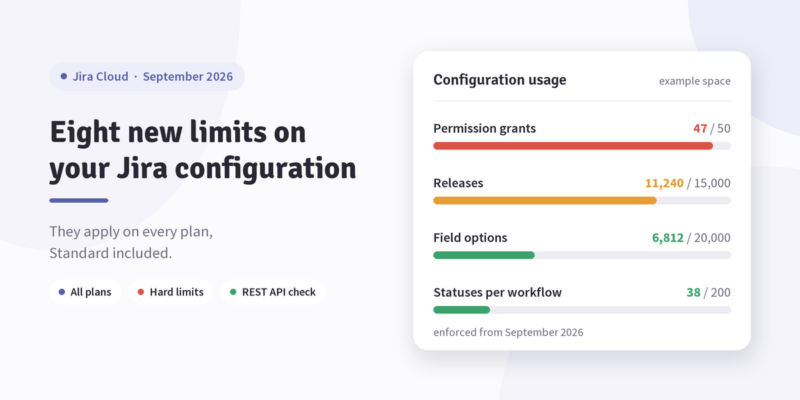
In September 2026 Atlassian starts enforcing eight new Jira data limits, this time on configuration rather than on what teams put inside a work item. They cap things like how many options a select field can hold and how many releases a project can accumulate, and they apply on every plan, Standard included.
Most instances will clear most of them without anyone doing anything. The work worth doing is finding out which ones you are near, and that check takes an afternoon.
The eight new Jira data limits
| What is capped | Limit | Scope |
|---|---|---|
| Field options | 20,000 | per field |
| Releases (versions) | 15,000 | per space |
| Components | 10,000 | per space |
| Statuses | 200 | per workflow |
| Workflows | 150 | per workflow scheme |
| Priorities | 100 | per space |
| Permission grants | 50 | per permission |
| Work item security levels | 50 | per space |
Two of these get quoted with the wrong scope, including in Atlassian’s own announcement post. Workflows are capped per workflow scheme, not per site: 400 workflows across the instance is fine, 151 in one scheme is not. Statuses are capped per workflow, so your global status list can be much longer than 200.
On terminology: Atlassian now writes space where most admins still say project, and work item where they say issue.
March 2026 already happened
September is the second wave. The first came into force in March 2026 and caps fields at 700 per space and work types at 150 per space. The field count runs through field configuration schemes and ignores anything in the trash. If a space is already over either number, you cannot associate more fields or work types with it until you bring the count down.
Limits and guardrails are not the same
Atlassian publishes both, and the difference matters. Limits are enforced in code. Guardrails are recommended ceilings that nothing stops you crossing, but past which Atlassian stops promising performance.
The current guardrails: 18,000,000 work items and 8,400 spaces per site, 5,000 space role actors per space, 2,000 space roles per user per site. The first two are large enough that if you are close to either, your problem is architectural rather than a cleanup task.
What enforcement looks like
Only the action that would cross the line gets blocked. Teams keep creating work items, commenting and transitioning as normal. What stops is the specific admin operation: adding option 20,001 to a field, creating release 15,001, adding a 51st grant to Browse Projects.
Nothing already stored is deleted. Configuration that is over the line on the enforcement date stays where it is, and you are simply prevented from adding more of it.
If you are migrating to Cloud, you get six months from your migration date rather than a September deadline. That is long enough to fold a configuration audit into the migration rather than running it twice, which is also cheaper. Our migration program covers the app side of that move.
How this differs from the 2024 and 2025 issue limits
Admins who worked through the earlier caps may read this as more of the same. It is a different problem with a different owner.
| 2024–2025 work item limits | 2026 configuration limits | |
|---|---|---|
| What is capped | Content in one work item: comments, worklogs, attachments, links | Configuration of a space, scheme or field |
| What creates the growth | Users and integrations | Admin decisions, accumulated over years |
| At the cap | Overflow is moved or exported to a linked item or archive | The admin action is blocked |
| Remediation | Split the item, change the process | Consolidate or delete configuration |
The 2026 configuration caps and the older per-item Jira data limits are both live at once. For the per-item side, our guide to Jira Cloud issue limits covers the rules and the remediation options, and the 2025 update covers the change to 10,000 worklogs.
Where the pressure usually comes from
Spreading your preparation evenly across all eight is a waste of time. Three of them have a mechanism behind them that reliably produces growth.
Permission grants, 50 per permission. The tightest number on the list by a wide margin, and the one that grows through ordinary admin work. Schemes built around one group per team run out fast: fifty teams with Browse Projects granted individually and you are at the limit for that one permission. Role-based grants do not have this problem, which is the argument for them.
Releases, 15,000 per space. Hand-maintained release lists never come close. A CI pipeline that creates a version per build does: thirty builds a day reaches 15,000 in about sixteen months, and nobody notices because nobody reads the releases page.
Field options, 20,000 per field. A dropdown someone maintains by hand will not get there. One populated from an external system might, and customer lists, cost centres and asset registers are the usual candidates.
Of the rest, statuses per workflow and workflows per scheme are rare but awkward when they happen, because the instance that hits them does so in the one large shared scheme that half the organisation depends on. Issue security levels only matter if you use issue security, and instances that do tend to add a level per client. Components and priorities are worth counting once so you can stop thinking about them.
Counting your own instance
Site Optimizer shows this inside Jira, but it ships with Premium and Enterprise. On Standard you can still get every number out of the public REST API.
| Limit | Where to count it |
|---|---|
| Field options | GET /rest/api/3/field, then GET /rest/api/3/field/{fieldId}/context/{contextId}/option for each context |
| Releases | GET /rest/api/3/project/{projectIdOrKey}/version |
| Components | GET /rest/api/3/project/{projectIdOrKey}/component |
| Priorities | GET /rest/api/3/priority/search |
| Permission grants | GET /rest/api/3/permissionscheme/{schemeId}/permission |
| Security levels | GET /rest/api/3/issuesecurityschemes and /issuesecurityschemes/level |
| Workflows and statuses | GET /rest/api/3/workflowscheme, plus the Workflows API |
| Per-item limits | GET /rest/api/3/issue/limit/report |
Two things to watch when you run this. Count at the scope the limit uses: the common mistake is totalling permission grants per scheme, seeing a comfortable number and moving on, when the cap is 50 grants on a single permission. And the paginated endpoints return a total in the first response, so you do not need to page through everything to get a count.
Write the numbers down with a date. One measurement tells you whether you are over. Two tell you when you will be, and for the three limits above that is the more useful answer.
The cleanup tools
Atlassian shipped remediation alongside the limits, and it is not gated behind Premium. You can bulk-disable unused custom field options, bulk-delete unused work item security levels, and strip unused groups and suspended users out of permission grants.
Run the last one first. In an instance that has been going for years, a good share of permission grants point at groups with no members left or at people who have gone, which means the tightest limit on the list is often also the cheapest to get back under.
Making it a recurring check
A script answers the question once, for whoever ran it. The question comes back every quarter.
When the per-issue limits landed in 2024 we built this as a Report Builder report on top of Jira’s Issue Limit Report API: a dashboard gadget showing each limit in green, amber or red, with a click through to the affected issues. The write-up includes the import guide.
The configuration limits need a different set of calls but the same shape of report. Report Builder can hit the endpoints above on a schedule, compare each count against the published limit and put the result on a dashboard, including the change since last month. If you would rather have it built than build it, book a demo and we will go through it.
Before September
Count everything once, across every space and scheme. Half a day of scripting either closes the subject or tells you exactly where to look.
Give anything past 80 percent of a limit an owner and a date, starting with permission grants.
Then find whatever is generating the growth. A cleanup that leaves the pipeline creating a version per build in place buys months, not years.
Re-run the count in early September so you have a reading either side of the enforcement date, and keep it running after that.
Common questions
Do these apply to Standard? Yes, to every plan in the Jira Cloud family and to Atlassian Government Cloud. What differs by plan is the tooling: Site Optimizer is Premium and Enterprise only.
What happens to configuration already over a limit? It stays. Nothing is deleted and users are unaffected. You cannot add more of that entity until the count comes down.
Are these the comment and worklog limits? No. Those cap content inside a single work item and have been enforced since 2024. These cap configuration.
Sources
- Data limits and guardrails, Atlassian Support
- Growing our investment in a faster, cleaner Jira, Atlassian Community
- Jira Cloud platform REST API

 Request