Capacity Planning in Jira: The Complete 2026 Resource Planning Guide
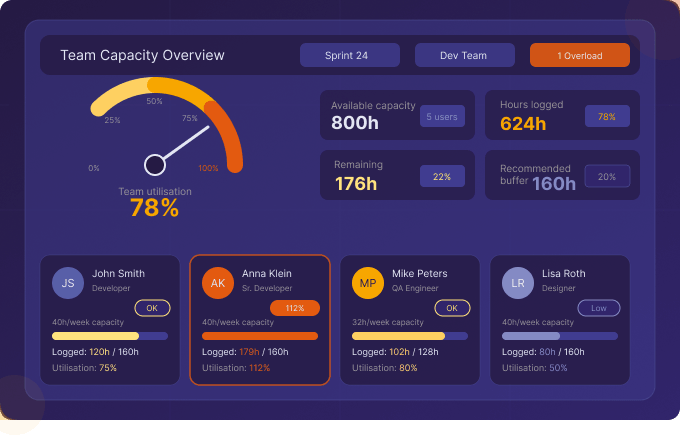
Ask any engineering manager what keeps them up at night, and “team capacity” will be near the top of the list. Who is available for the next sprint? Which team member is overloaded? Are we taking on more than we can deliver? In 2026, Jira capacity planning and resource planning have become non-negotiable disciplines for any team that wants to ship reliably — not scramble constantly.
This guide covers how to implement capacity planning in Jira from scratch, what tools you need, and how Timesheet Builder by Actonic gives team leads the visibility they need to plan with confidence.
What is Capacity Planning in Jira?
Jira capacity planning is the process of understanding how much work your team can realistically handle in a given time period — a sprint, a month, or a quarter — and aligning your Jira backlog accordingly. It combines three key data sources:
- Team availability: How many hours is each person available (accounting for holidays, meetings, leave)?
- Historical velocity: How much time did the team actually log in past sprints?
- Planned work: How many story points or estimated hours are in the upcoming sprint?
Without accurate Jira time tracking data feeding into your capacity model, planning becomes guesswork. With it, you can make data-driven commitments your team can actually meet.
Why Native Jira Lacks Proper Capacity Planning
Jira’s built-in tools are excellent for backlog management, sprint planning, and issue tracking — but they were not designed for resource management. Specifically, Jira lacks:
- No per-user capacity definition (e.g., “Alice works 32 hours/week, Bob is 50% on another project”)
- No real-time utilisation tracking (logged hours vs. available hours)
- No visual capacity dashboard across multiple teams
- No alerts when a team member is over capacity
- No historical capacity trend data
This is why dedicated Jira resource planning tools are essential for any team with more than 5 people or more than one concurrent project.
Timesheet Builder: Built-In Capacity Planning for Jira
Timesheet Builder by Actonic includes a complete Jira capacity planning module that integrates directly with your team’s worklog data. Here’s what it enables:
Define Team Capacity
Set the weekly available hours for each team member directly in Timesheet Builder. Account for part-time workers, contractors, and varying schedules. Capacity is defined once and automatically applied to team overview dashboard.
Real-Time Utilisation Dashboard
The team management view shows a live comparison of:
- Defined capacity (available hours)
- Logged hours to date (actual time spent)
- Progress (% of used time)
At a glance, team leads can see who is over capacity, who has bandwidth, and whether the team as a whole is on track.
Step-by-Step: Setting Up Jira Capacity Planning with Timesheet Builder
Step 1 — Create Your Teams
In Timesheet Builder, navigate to Teams → Create Team. Add all team members using the bulk import feature. Assign each person a role: Member, Team Lead, or Manager.
Step 2 — Define Workload Calendar per Person
For each team member, set their weekly available hours. Example: a full-time developer = 40h/week. A part-time QA engineer = 20h/week. These values drive all capacity calculations automatically.
Step 3 — Connect to Jira Worklogs
Timesheet Builder is available in Jira work items — log time directly in Work logs panel and no double-entry needed. As team members log time on Jira issues to the team, their actual hours are automatically reflected in the Team overview dashboard.
Step 4 — Monitor the Capacity Dashboard
Open the team’s capacity view at any point during the period (weekly or monthly). You’ll immediately see:
- Total available hours for the period (based on workload calendar and non-working days)
- Hours logged so far
- Percentage utilised
- Individual breakdown by team member on Worklog analysis view
Step 5 — Export for Stakeholder Reporting
At the end of each sprint or month, export the capacity report to Excel for sharing with stakeholders, project sponsors, or HR teams managing headcount planning.
Capacity Planning Best Practices for Agile Teams in Jira
- Never plan to 100% capacity: Always leave 15–20% buffer for unexpected issues, meetings, and tech debt
- Account for vacation and public holidays: Adjust capacity definitions before each sprint planning session
- Track historical utilisation trends: If your team consistently runs at 115% capacity, your load is systematically underestimated
- Separate project work from operational work: Use worklog attributes to distinguish project time from BAU activities
- Review capacity vs. velocity at retrospectives: The gap between planned and logged hours is your most valuable planning input
- Use capacity data for hiring decisions: Consistent over-capacity signals a business case for additional headcount
Capacity Planning FAQ
Does Jira have capacity planning built in?
Jira includes a basic “Backlog” view and sprint planning board, but no capacity or resource management features. For true Jira capacity planning, you need a dedicated app like Timesheet Builder.
How do I track team utilisation in Jira?
With Timesheet Builder, utilisation is calculated automatically by comparing each team member’s logged hours (from worklogs) against their defined weekly capacity. The result is displayed as a percentage or number of hours in the Team Overview dashboard.
Can Timesheet Builder handle multiple teams?
Yes. Timesheet Builder supports unlimited teams, and team leads can have custom permissions defining which teams’ data they can view.
Stop Guessing. Start Planning with Real Data.
Jira capacity planning and resource planning are the difference between a team that delivers predictably and one that is always firefighting. Timesheet Builder by Actonic gives every team lead the data they need — utilisation rates, sprint capacity, team availability — all in one place, built natively for Jira Cloud.
Timesheet Builder: Resource Planning and Teams Management
Kapazitätsplanung und Ressourcenmanagement direkt in Jira. Definieren Sie Team-Kapazitäten, überwachen Sie die Auslastung in Echtzeit und exportieren Sie Berichte — die einzige DSGVO-konforme Lösung für Jira Cloud.
Data Protection and Security Toolkit für Jira
Weltweite Datenschutzrichtlinien — GDPR, CCPA, HIPAA — direkt in Jira einhalten. Schützen Sie persönliche Daten in Worklogs und Zeiterfassungsberichten mit unserem einzigartigen Datenschutz-Toolkit.
All our apps in the Atlassian Marketplace:


 Request