Antivirus for Jira vs. attachment scanning: which do you actually need?
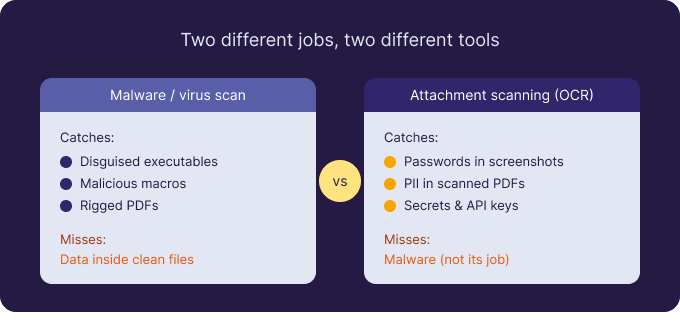
“Scanning Jira attachments” gets used for two completely different jobs, and conflating them leads teams to buy the wrong thing — or to assume one tool covers both. One job is catching files that are dangerous by nature. The other is finding sensitive information inside files that are perfectly safe. Here’s how the two categories differ, what each misses, and how to tell which you need.
Category one — malware and virus scanning
This is the antivirus layer. It asks: is this file itself a threat? Atlassian Cloud applies native malware detection to uploads, and many organisations add endpoint antivirus for files that get downloaded from Jira. It catches disguised executables, malicious macros, and rigged PDFs. If your concern is “someone uploaded something that could infect us,” this is the category you want. What it does not do is read or judge the content of a clean file.
Category two — sensitive-data (content) scanning
This layer asks a different question: is this file, harmless as it is, exposing data we shouldn’t hold? A screenshot with a plaintext password, a scanned passport on a support ticket, a spreadsheet of customer records — none are malware, so a virus scan ignores them. Finding them means reading what’s written inside each file, including images and scanned PDFs. That’s what Attachment Scanner for Jira does, using built-in OCR and patterns you define (simple text or regex) across a JQL scope.
What each one catches — and misses
| Malware / virus scan | Attachment scanning (OCR) | |
|---|---|---|
| Question it answers | Is this file dangerous? | Is the data inside it sensitive? |
| Catches | Executables, macros, rigged files | Passwords, PII, API keys, secrets |
| Reads images & scans | For malware signatures only | Yes — reads the text via OCR |
| Blind spot | Sensitive data in clean files | Malware (not its job) |
So which do you need?
If you’ve never scanned attachments at all, start with the malware layer — Atlassian provides a baseline already, so confirm it’s on and consider antivirus for downloaded files. If you handle personal data, run a service desk, or face GDPR, PCI-DSS, or HIPAA scrutiny, the bigger unmanaged risk is usually the content layer: the data sitting unread inside attachments. Most regulated teams end up needing both, because the two cover non-overlapping gaps.
Being honest about the trade-offs
Attachment Scanner is focused, not all-purpose. It is on-demand, not continuous; Jira Cloud only, with no Data Center or Confluence support yet; and you define detection patterns rather than choosing from a large shipped rule library. In return you get OCR coverage of images and scans, EU/EEA processing with no public AI service, in-memory handling, and human-confirmed deletion with an audit log. It complements your antivirus; it doesn’t replace it. You can try it free for 30 days on the Atlassian Marketplace.

 Request