Jira JQL: = and IN on Text Fields Are Switching to Exact Phrase Search
TL;DR
Atlassian announced on 6 October 2026 (CHANGE-3440) that =, IN and NOT IN on text fields now run an exact phrase search instead of a full-value match. Atlassian’s example: textField = "urgent" matches “urgent”, “urgent issue” and “very urgent issue”, not only a field whose whole value is “urgent”.
=andINget broader: filters, gadgets and automation rules can return more issues.NOT INgets narrower: it drops every issue whose text contains the phrase.- You can preview the results today: Atlassian defines the new
=as the same search as~with escaped quotes,textField ~ "\"urgent\"".
Not live yet on the two Cloud sites we checked (6 October 2026): on Epic Name, which accepts =, the operator still compared the whole value, and Summary and other standard text fields still reject =. The results below come from the equivalent ~ query, run against 12 demo work items on one test site.
What exactly changed
The operator stops comparing the whole value and looks for the phrase anywhere inside it. Atlassian’s rules, as published:
| Rule | Per Atlassian, after CHANGE-3440 |
| Match scope | The phrase may appear anywhere in the text; before, the whole value had to be equal |
textField = "urgent" |
Matches “urgent”, “urgent issue” and “very urgent issue” |
| Several words | Same words, same order, next to each other: "alpha beta" matches “prefix alpha beta suffix”, not “beta alpha” or “alpha something beta” |
| Case | Insensitive |
| Stemming | Still applies: “run” may match “running” (our test below disagrees) |
IN ("alpha beta", "urgent") |
Matches either phrase anywhere in the text |
NOT IN (…) |
Follows from the above: excludes items that contain any of the phrases |
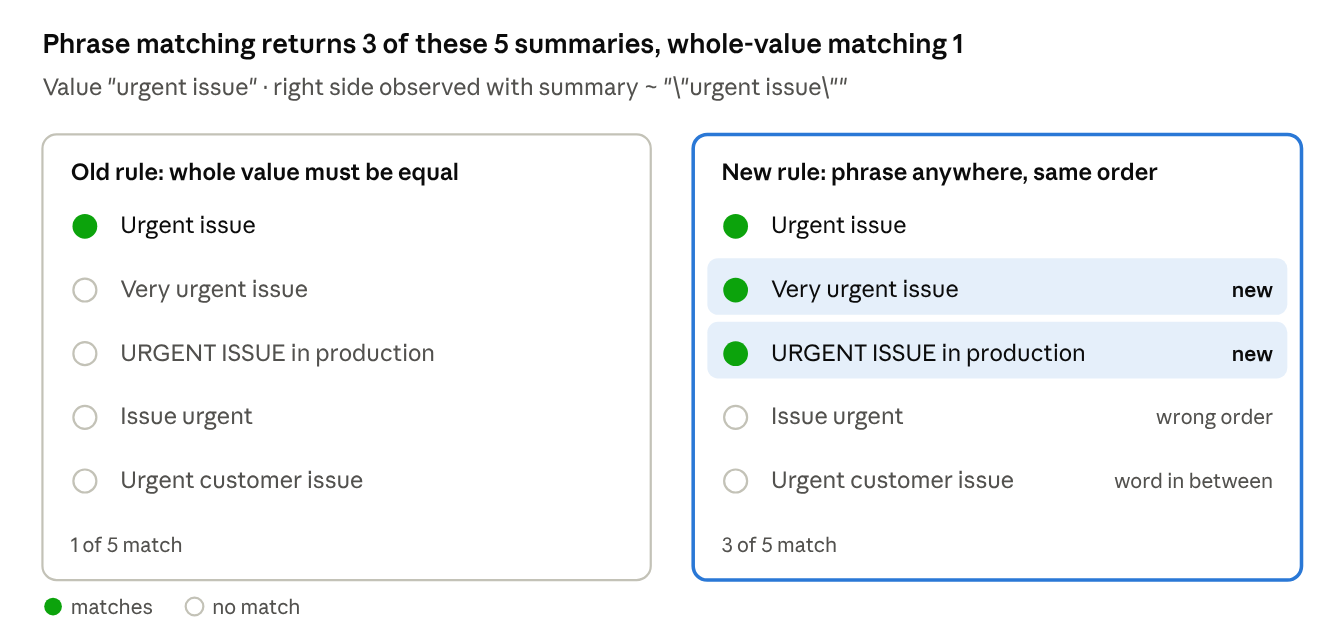
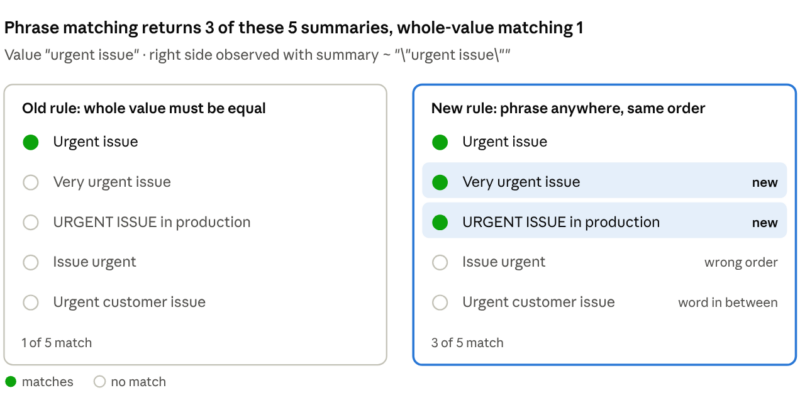
The left panel applies the old whole-value rule as Atlassian describes it; Summary itself never accepted =. The right panel is what summary ~ "\"urgent issue\"" returned on our test site.
Which fields does this touch? The notice does not list them. On both sites we checked, Jira still rejects =, !=, IN and NOT IN on Summary, Description, Environment, Comment and Short text / Paragraph custom fields (“The operator ‘=’ is not supported by the ‘summary’ field”), and refuses to save a filter with that JQL. Some string-valued fields already accept = and IN, for example URL fields and some Atlassian- or app-provided fields. Audit both groups; the script below covers them.
Is it live yet? Not on our two sites as of 6 October 2026. The Epic Name field accepts both = and ~, so it shows which rule is active. = still compared the whole value on both sites:
| Query on 6 Oct 2026 | Old rule expects | New rule expects | Returned |
"Epic Name" = "iOS Platform Update" |
the epic | the epic | the epic |
"Epic Name" = "ios platform update" |
the epic | the epic | the epic |
"Epic Name" = "Platform Update" |
nothing | the epic | nothing |
"Epic Name" ~ "\"Platform Update\"" |
the epic | the epic | the epic |
"Epic Name" = "Dashboard" |
nothing | 2 epics with “Dashboard” in the name | nothing |
"Epic Name" IN ("Dashboard", "Cloud") |
the “Cloud” epic | 3 epics | the “Cloud” epic |
Run the third query against an Epic Name on your own site. If it starts returning the epic, the change has reached you.

Today, summary = "Urgent issue" is rejected in the issue search on our test site (6 Oct 2026).
Tested on a real Cloud site
We ran the ~ query that Atlassian says equals the new =. The results follow the published phrase rules, except that a quoted phrase did not stem. The 12 demo work items, labelled jql-phrase-demo, have these summaries: “Urgent”, “Urgent issue”, “Very urgent issue”, “URGENT ISSUE in production”, “Issue urgent”, “Urgent customer issue”, “Not urgent”, “Urgently needed: VPN access”, “Server running out of memory”, “Alpha beta release notes”, “Beta alpha rollback” and “Alpha build for beta testers”.
Each query was prefixed with labels = jql-phrase-demo AND:
| Query we ran (works today) | Equivalent new = / IN, per Atlassian |
Returned | Not returned (notable) |
summary ~ "\"urgent\"" |
summary = "urgent" |
7: Urgent, Urgent issue, Very urgent issue, URGENT ISSUE in production, Issue urgent, Urgent customer issue, Not urgent | Urgently needed: VPN access |
summary ~ "\"urgent issue\"" |
summary = "urgent issue" |
3: Urgent issue, Very urgent issue, URGENT ISSUE in production | Issue urgent (order), Urgent customer issue (gap), Urgent |
summary ~ "\"alpha beta\"" |
summary = "alpha beta" |
1: Alpha beta release notes | Beta alpha rollback, Alpha build for beta testers |
summary ~ "alpha beta" |
none (words, no phrase) | 3: all three alpha/beta items | — |
(summary ~ "\"urgent issue\"" OR summary ~ "\"alpha beta\"") |
summary IN ("urgent issue", "alpha beta") |
4 | — |
summary !~ "\"urgent\"" |
summary NOT IN ("urgent") |
5: the three alpha/beta items, Server running out of memory, Urgently needed | 7 items, including Not urgent |
summary ~ "\"run\"" |
summary = "run" |
0 | Server running out of memory |
summary ~ "run" |
none (word search) | 1: Server running out of memory | — |
Stemming: the notice says the new = equals ~ with escaped quotes, and also that it still stems. On our site those two statements conflict: the quoted ~ "\"run\"" found nothing, and only the unquoted ~ "run" found “running”. Atlassian’s phrase search article also says a phrase finds no word variations. Don’t rely on either behaviour until you can test = on your own site.
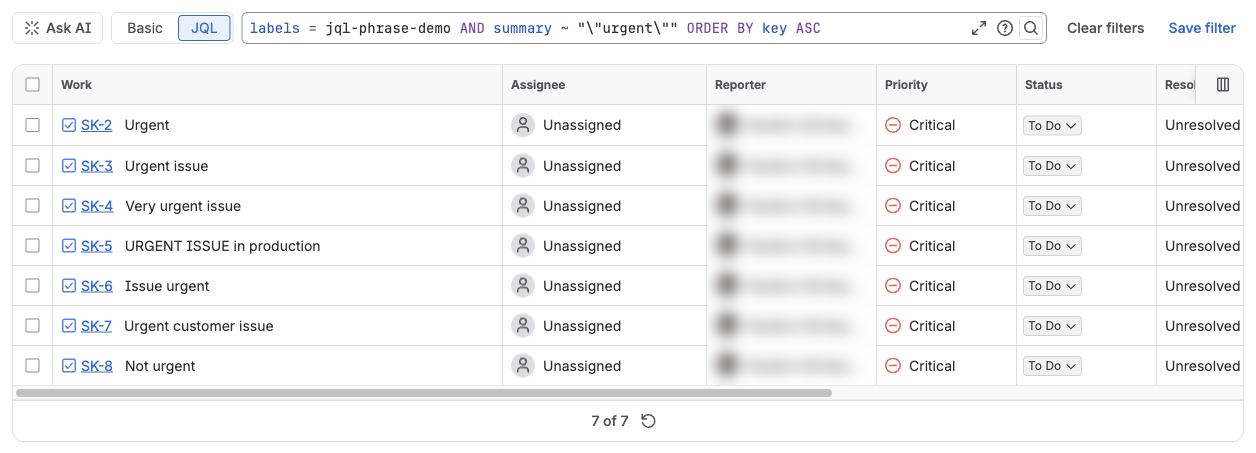
"urgent" as a phrase: every summary that contains the word, in any position and any case.
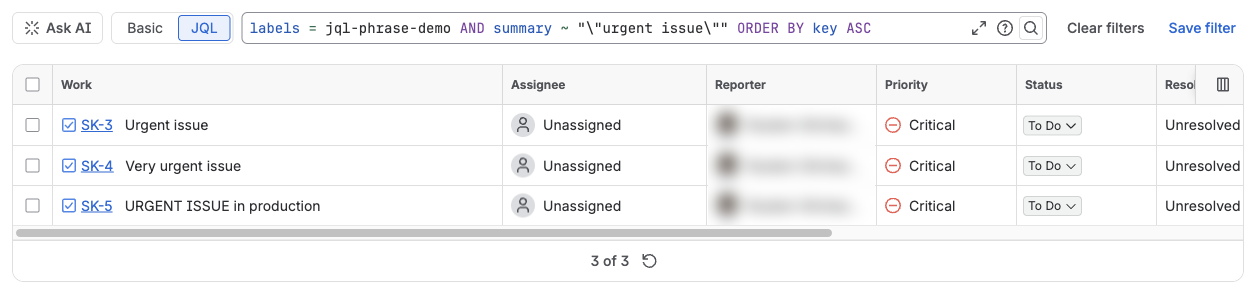
"urgent issue": only the words together, in that order. “Issue urgent” and “Urgent customer issue” drop out.
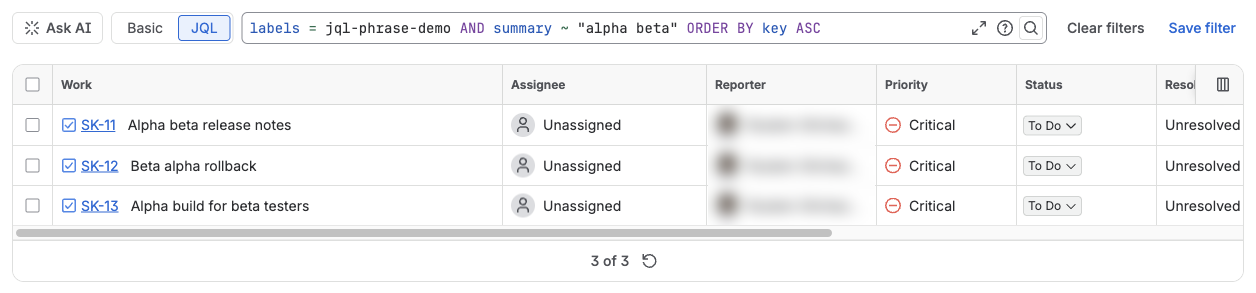

Without escaped quotes, ~ "alpha beta" finds the words in any order (3 items). With them, only “Alpha beta release notes” remains.
Where this bites
The riskiest places are the ones nobody looks at: rules and scripts that run unattended and act on whatever the query returns.
- Saved filters, board filters, dashboard gadgets. An
=orINon a text value can return more items, so counts, charts and swimlanes grow. Shared filters change for everyone who uses them. - Automation rules. JQL conditions and “Lookup work items” actions that use
=match more items, and the rule then edits, transitions or notifies all of them. NOT INused as an exclusion list. It stops hiding one exact value and hides every item that contains the phrase. The equivalent!~query on our site also excluded “Not urgent” (screenshot below).- Scripts and apps that call the REST API. On our sites,
POST /rest/api/3/search/jqlanswered HTTP 200 with an emptyissueslist forsummary = "…", with no error or warning, while the issue search UI showed the error. A script that looks upsummary = "<marker>"before creating an item therefore never finds it and creates a duplicate every time. If=starts phrase-matching on that field, the same lookup can instead return “Nightly build 2” for “Nightly build”. Validate generated JQL withPOST /rest/api/3/jql/parse?validation=strict, and compare the returned value exactly in code.
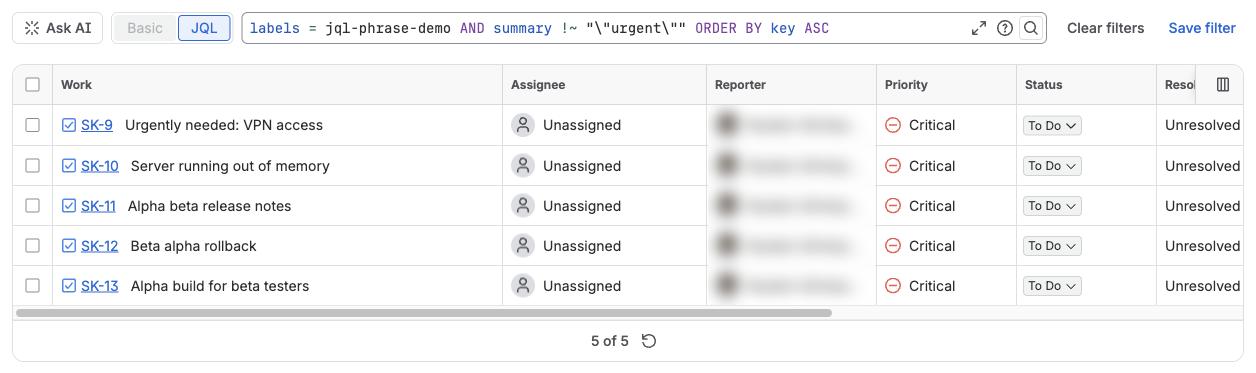
The NOT IN ("urgent") equivalent keeps 5 of 12 items. “Not urgent” and every other item containing the word is excluded; “Urgently needed” stays, because a phrase does not match other word forms.
How to audit your site
Start with saved filters: gadgets, boards and some automation rules run on them. The script below lists every saved filter that uses =, !=, IN or NOT IN on a string-valued field, plus Summary and the other standard text fields as a safety net. It reads the field list from your own site, so app-provided fields are included.
- Open your Jira site in the browser as a user with the Administer Jira global permission. The script passes
overrideSharePermissions=true, so it sees every filter, not only those shared with you. - Open the developer console (F12 → Console), paste the script and press Enter.
- Review each row it prints:
clauseshows the field and operator,jqlthe full query. Expect some false positives: keyword-style string fields that accept=may not be affected.
// Paste into the browser console on https://<your-site>.atlassian.net
(async () => {
  const ac = await (await fetch('/rest/api/3/jql/autocompletedata')).json();
  const fields = ac.visibleFieldNames.filter(f =>
    (f.types || []).includes('java.lang.String') &&
    !f.value.endsWith('.property') &&
    f.operators.some(op => ['=', '!=', 'in', 'not in'].includes(op)));
  const names = new Set(['summary', 'description', 'environment', 'comment', 'text', 'textfields']);
  fields.forEach(f => {
    names.add(f.value.replace(/^"|"$/g, '').toLowerCase());
    if (f.cfid) names.add(f.cfid.toLowerCase());
  });
  const esc = s => s.replace(/[.*+?^${}()|[\]\\]/g, '\\$&');
  const re = new RegExp('(?:^|[\\s(])"?(' + [...names].map(esc).join('|') +
    ')"?\\s*(!=|=|not\\s+in\\b|in\\b)', 'i');
  const hits = [];
  for (let startAt = 0, last = false; !last;) {
    const page = await (await fetch('/rest/api/3/filter/search?expand=jql,owner' +
      `&overrideSharePermissions=true&maxResults=100&startAt=${startAt}`)).json();
    page.values.forEach(f => {
      const m = (f.jql || '').match(re);
      if (m) hits.push({ id: f.id, name: f.name, owner: f.owner?.displayName,
                         clause: m[0].trim(), jql: f.jql });
    });
    last = page.isLast; startAt += page.maxResults;
  }
  console.table(hits);
  return hits;
})();
On our test site it flagged the one demo filter that uses "Project overview key" = "SK" and skipped the one that uses ~. It only calls GET endpoints.
Then cover what the script cannot see:
- Automation: in Settings → System → Global automation, export your rules as JSON. Quotes inside JQL are escaped there, so search case-insensitively with a regex such as
(=|!=|\bin\b|\bnot in\b)next to your text field names. - Your own scripts and apps: search the code for JQL that uses
=orINon text values, and validate it with the parse endpoint above. - Shared dashboards: note the counts on your busiest gadgets now, so you can compare once the change reaches your site.
Rewrite cheat sheet
Pick the operator by what you mean, not by habit. The first five rows ran on our test site exactly as written.
| You want | Write | Note |
| The exact phrase, anywhere in the text | summary ~ "\"urgent issue\"" |
Same result as the new =; works today |
| The words in any order (no phrase) | summary ~ "alpha beta" |
Unquoted terms stem: ~ "run" found “running” |
| Any of several phrases | (summary ~ "\"urgent issue\"" OR summary ~ "\"alpha beta\"") |
Same as the new IN |
| Exclude a phrase | summary !~ "\"urgent\"" |
Same as the new NOT IN; also drops “Not urgent” |
| Words starting with a prefix | summary ~ "urge*" |
Found 8 items, incl. “Urgently”; a leading * is rejected |
| The whole value and nothing else | Not possible on Summary, Description, Environment, Comment, Short text or Paragraph fields | Narrow with the phrase search, then compare the full value in an automation condition or in code |
If you need exact matching on a value every time, store it in a field built for it: a select list, labels or a component.
FAQ
Do I have to change anything right now? Only if a filter, rule or script relies on =, IN or NOT IN returning whole-value matches on a text value. Run the audit, then rewrite with the cheat sheet so the intent is explicit.
Is ~ affected? The notice does not change it. ~ with and without escaped quotes is the reference Atlassian uses to describe the new =.