Detecting email addresses in Jira attachments – a practical GDPR habit
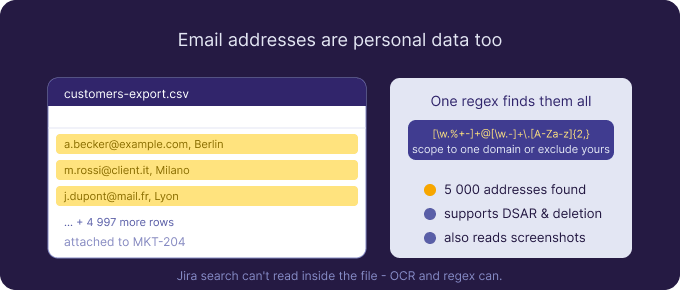
An email address is personal data. That single fact turns a lot of routine Jira activity into a quiet compliance question. Every exported customer list, every screenshot of an inbox, every CC-laden message saved as a PDF and attached to a ticket is a small pile of personal data sitting in your issue tracker. Individually harmless; collectively, exactly the kind of thing a data-protection authority — or a customer exercising their rights — will ask you to account for.
The good news is that email addresses are one of the easiest types of personal data to detect reliably, because they follow a strict, well-known format. If you want to find email addresses in Jira attachments, a single regular expression does most of the work.
Why emails in attachments are a real exposure
It’s tempting to dismiss email addresses as low-sensitivity. Under the GDPR and similar regimes they’re still personal data, and in bulk they’re a genuine liability. A spreadsheet of 5,000 customer addresses attached to a marketing ticket is a data set you now have to secure, account for, and be able to delete on request. A screenshot of a support inbox exposes the addresses of everyone who happened to be on screen. A forwarded email chain saved as a PDF carries the addresses of every participant. None of this is malicious, and all of it is the kind of data sprawl that audits and data-subject requests are designed to surface.
The blind spot: attachments your search can’t read
You can search Jira fields and comments for an address, but you cannot search the contents of an attached spreadsheet, PDF, or image — Jira indexes fields, not file contents. So the bulk of your email exposure, which lives precisely in those exports and screenshots, never shows up in a query. A malware scan won’t help either; a contact list is a clean file, and the risk is the data inside it, not the file itself. To find emails where they actually accumulate, you have to read inside the attachments — including the images, via OCR.
The pattern that does the work
Email addresses are a textbook case for regex, which is exactly what Attachment Scanner for Jira lets you supply. A standard pattern such as [A-Za-z0-9._%+-]+@[A-Za-z0-9.-]+\.[A-Za-z]{2,} will match the overwhelming majority of real addresses. From there you can tune for your situation: restrict to a particular domain to find a specific customer’s address across every ticket, or exclude your own corporate domain so internal addresses don’t drown out external personal data. Because you define the patterns rather than choosing from a fixed catalogue, you control precisely how broad or narrow the search is.
Point the scan at a JQL scope — a project, a label, everything with attachments since a given date — and the app reads every supported file: Office documents and CSV exports, text-layer and scanned PDFs, plain text, and images, using OCR for anything that isn’t already machine-readable. A document-only scan covers the spreadsheets and text files for free; a full scan adds the images and PDFs where addresses hide in screenshots and scans.
Reviewing matches without drowning in them
A broad email pattern will match a lot, so triage matters. Each result lists the issue key, the file name, the extraction type (OCR or direct), the matched address, and its surrounding context, and you click straight through to the issue in Jira. For high-volume data sets, the statistics dashboard is the more useful view: it shows match rates and the projects and work items with the most hits, so you can see at a glance which exports and which teams are accumulating the most personal data — and prioritise those rather than chasing individual matches.
Putting findings to work
Detecting email addresses isn’t usually about deleting every one — it’s about knowing where personal data lives so you can manage it. The same scan supports several real jobs. For a data-subject access or deletion request, scope the pattern to that person’s address and you have a defensible, auditable way to locate their data inside attachments. For data minimisation, you can find and bulk-delete the bulk exports that should never have been attached in the first place — an explicit, admin-confirmed action recorded in the audit log, never automatic. For ongoing hygiene, save the scan as a template and rerun it after busy periods.
Compliance honestly stated
Being able to find personal data inside attachments is a meaningful control for GDPR accountability and for honouring access and deletion rights — but no tool makes you compliant on its own, and this one is deliberately one technical control inside a broader programme. Its privacy model suits that role: OCR runs on dedicated EU/EEA GPU hardware with no public AI service, attachments are processed in memory and discarded, and only matched snippets are stored in Atlassian’s Forge storage, isolated per site. Notably, no reporter, assignee, or user-identity fields are read or stored — the app reads attachment contents, not who touched the issue.
Limits and a starting point
As with the rest of the app, scanning is on demand rather than continuous, and it’s Jira Cloud only for now. Regex will occasionally over- or under-match — it’s a detection aid, not a guarantee — so treat results as a prioritised worklist, not a final inventory. With that understood, finding email addresses is one of the quickest wins available: the pattern is simple, the coverage includes the screenshots and exports your other tools miss, and you can try it free for 30 days from the Atlassian Marketplace with monthly evaluation credits.

 Request